Kas tai yra?
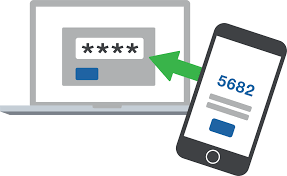
Dviejų žingsnių patvirtinimas – tai papildomas jūsų paskyros apsaugos lygis, kuris padeda apsisaugoti nuo įsilaužimo bandymų ir duomenų vagystės. Jis vykdomas naudojant kodus generuojančią programėlę, ją įdiegus ir sukonfigūravus jūsų telefone.
Kodėl tai reikalinga?
Dviejų žingsnių patvirtinimas padeda apsaugoti jūsų paskyrą:
- kai naudojate tą patį slaptažodį skirtingose svetainėse;
- atsisiunčiant programas iš interneto;
- naudojantis viešais kompiuteriais;
- spustelėjus nuorodas el. laiškuose.
Jūsų paskyros saugumo lygis žymiai padidėja. Prieiga prie jūsų el. pašto tampa neįmanoma net tuo atveju, jei jūsų slaptažodis buvo pavogtas.
Kaip tai veikia?
- Pirmiausia įvedate prisijungimo vardą ir slaptažodį;
- Tada – vienkartinį kodą iš programėlės, kuri įdiegta jūsų telefone.
Suderinamumas
Veikia su bet kuriuo telefonu, kuriame galima įdiegti kodų generavimo programėlę.
Kaip įjungti?
1) Įdiekite programėlę
- Android (FreOTP, Google Authentificator, Other)
- iOS (FreOTP, Google Authentificator, Other)
- Windows Phone (Authentificator, OTP Authentificator, Other)
2) Sukonfigūruokite paskyrą
- Prisijunkite prie savo paskyros per žiniatinklio sąsają;
- Eikite į vartotojo profilį;
- Atidarykite „Dviejų žingsnių autentifikavimas“ → „Įjungti“;
- Nuskenuokite QR kodą naudodami įdiegtą programėlę;
- Įveskite kodą į lauką „PIN kodas“;
- Paspauskite „Patvirtinti ir išsaugoti“.
Po sėkmingo nustatymo kiekvieną kartą jungiantis reikės įvesti kodą. Kodą generuos programėlė jūsų telefone.
Kaip išjungti?
- Eikite į „Vartotojo profilį“;
- Pasirinkite „Dviejų žingsnių autentifikavimas“;
- Paspauskite „Išjungti“ ir patvirtinkite veiksmą.
Problemos su kodu
Jei kodas netinka – patikrinkite laiką telefone arba įjunkite automatinį laiko nustatymą.
Jei telefonas pamestas arba programėlė pašalinta
Atlikite slaptažodžio atkūrimą. Po to dviejų žingsnių patvirtinimas bus automatiškai išjungtas jūsų paskyrai, ir galėsite prisijungti naudodami naują slaptažodį.
Registruodamiesi kaip naujas vartotojas, Jūs nurodėte savo asmeninę informaciją, kuri buvo panaudota Jūsų paskyrai. Jeigu nurodėte neteisingą informaciją arba ji pasikeitė, Jūs galite pakeisti ir duomenis pašto paskyroje.
Jeigu norite pakeisti pagrindinę asmeninę informaciją, tai galite padaryti skyriuje „Vartotojo profilis“ (daugiau).
Jeigu norite pakeisti tik tuos duomenis, kurią mato Jūsų adresatai, tai galite padaryti skyriuje „Nustatymai“ – daugiau informacijos rasite čia.
Why are you receiving this notification?
To increase the security of mailboxes registered in inbox.eu against online threats, and to help users keep up with their account security, any user of our email servers could receive an informative notification about unusual login activity: for example, about attempts to log in to a user account from unusual browsers or devices. Unfortunately, inbox.eu cannot determine what person is attempting a specific login, so you should bear in mind that you may receive this when you use your email for the first time on a new computer, phone or browser; if you use your browser’s incognito or private browsing mode; if you have deleted your cookies; as well as if someone else has accessed your account.
What to do if someone else has logged in to your mailbox?
If, after receiving this notification, you feel that someone else may have accessed your email, we recommend the following actions for your security:
- Update your account password,
- Change your secret question and answer,
- Add an alternative email address and/or your phone number to your account’s profile settings,
- Apply an additional inbox safety feature - two-step verification,
- If you access your emails using POP3/IMAP protocols, we recommend checking to see if data encryption (TLS/SSL) is enabled,
- Temporarily remove alternative access to your mailbox through Facebook and Twitter.
How to switch off this notification?
If you are sure that no suspicious activity is taking place in your account and you would no longer like to receive notifications regarding suspicious access to your account, go to Settings -> User profile -> Notifications, remove the check from “Receive notifications for suspicious account access,” and press Save.
Where to find out more about a specific login?
In the informative message you received, the following information is available:
- Date - when and at what time the suspicious login took place,
- Country - from which country the access occurred,
- Operating system - what kind of device was used for the login, whether a Windows/Linux system or mobile phone (Android / iOS.)
Meanwhile, on your profile, you can see the IP address of the last successful login; if you still need further information, send a request from your mailbox to support@inbox.eu
Pirminiame puslapyje „Vartotojo paskyra“ rasite informaciją apie paskutinės sėkmingos autorizacijos (prisijungimo) datą ir IP adresą, taip pat informaciją apie Jūsų profilio registraciją.
Ši informacija gali pagelbėti savarankiškai kontroliuoti pašto dėžutės pasiekiamumą. Šiuo būdu taip pat galite atskleisti neteisėtą prieigą prie Jūsų pašto dėžutės ir apie tai pranešti Inbox.lv administracijai.

| Personal Trial | Personal Premium | |
| Mailbox Quota | 100 GB | 100 GB |
| Valided mobile phone | required | not required |
| POP3/IMAP | no | available |
| Smtp | no | available |
| Email sending | 3 letters per day | unlimited |
| New emails delivery | unlimited | unlimited |
| Files Storage | 10 GB | 10 GB |
| Aliases | no | 5 aliases |
| Forward of email | 3 letters per day | unlimited |
| Max size of incoming email | 60 MB | 60 MB |
| Price | 30-days free* | 9.99 eur per year |
*after the end of the 30-day trial period, TRIAL email addresses without validated mobile phone number will be deleted.
Additional features:
2-step verification
Extra protection for any of your domain mailboxes with a connected mobile phone.
Access to Aliases
You can pay only for one mailbox, but use 5 more aliases for free. All mails sent to the specified aliases will go to your main mailbox. Aliases works without any time limits.
Mobile application
We offer a separate mobile application for working with email on Andorid / iOs phones. Multi-account support, new mail notifications, contact synchronization and other necessary functions for convenient and fast mail handling via mobile phone or tablet.
Privacy of your data
We guarantee the security of your data. We do not store or pass on your personal information to third parties, either government agencies or advertisers. You have the right to delete all your data at any time in accordance with the General Data Protection Regulation (GDPR).
Calendars and contacts
Access to a simple scheduler and contact storage system. Ability to synchronize calendar and contacts via mobile phone using the mobile application inbox.eu.
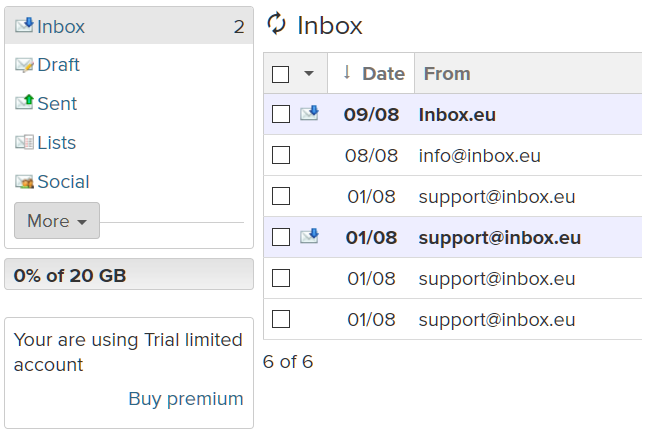
Go to your mailbox, for example, user@inbox.eu. On the left side, you will see your mailbox status. Click on “Buy Premium” or "Extend".
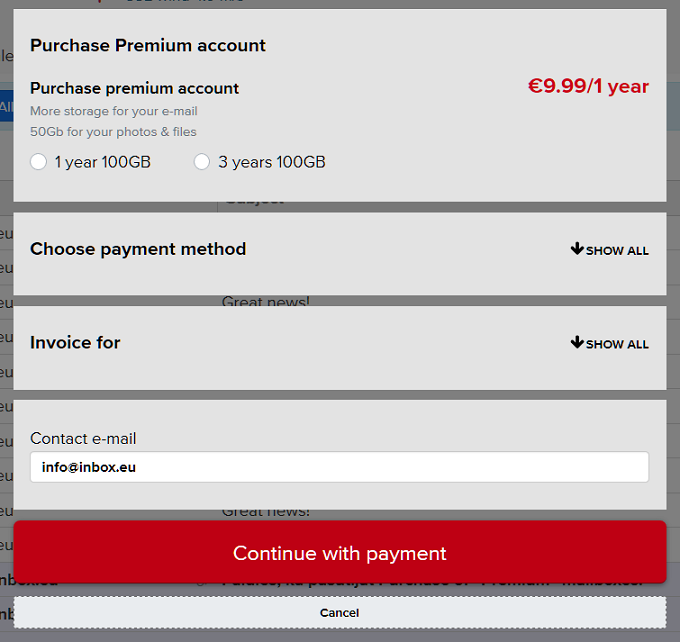
In the open window, select the activation period, the payment method, fill in the required fields, and click on “Continue with payment”. After that, you will be redirected to the page with a message about successful account creation or you will go to the bank payment system portal to make a payment.
Pay the bill, and the Premium subscription will be activated immediately after the money has been received.