• Mail
  • Dokumentai
  • Kontaktai
  • Kalendorius
  • Žaidimai
  • Reklama
  • Daugiau
    • Dokumentai
    • Kontaktai
    • Kalendorius
    • Žaidimai

    Gaukite Premium
LT Lietuvių
  • English
  • Latviešu
  • Русский
  • বাংলা
  • ਪੰਜਾਬੀ
  • Indonesian
  • Español
  • Eesti
  • Français
  • Deutsch
  • عربي
  1. Pagrindinis
  2. Verslo el. paštas

%MESSAGE%
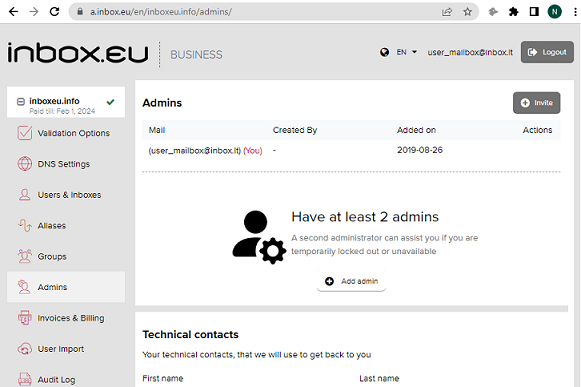
How add other administrator

  1. Login to admin panel of your domain email
  2. Open “Administrators” section
  3. Click on the “Invite” button or “Add new” and write email address of new administrator, click Send. Message will be sent to this email address.
  4. Login to mailbox, open this message and click “Approve invite” 
  5. Next step –  create authorization account (password and username)
  6. After successful login, new administrator can do management of your domain email.
daf1061bd3ce46dbf649ee92805ef7-1683545191-base.png


Jei neradote atsakymo, susisiekite su mumis
Klausimai

Business Inbox Registration
Email inbox.lv migration to domain email
Creating User Mailboxes or Domain Mailboxes
Single-sign-on (SSO) with SAML & LDAP
Catch-all feature
Premium Subscription for Business Inbox
Business Domain Email and Premium
How to log in to admin panel
Recommended steps for successful migration of existing mailboxes
What is domain name
How to create domain email address?
How and where to get a domain name for my e-mail
Email migration from G-Suite/Google (1st method)
Email migration from G-Suite/Google (custom domains only, 2nd method)
Can't register a domain
Demo version of business mail on Inbox.eu!
Inbox.eu API (api.inbox.eu)
How add other administrator
End-to-end encryption
Inbox.eu Affiliate Program
Registruotis Įeiti

  • Mail
  • Dokumentai
  • Kontaktai
  • Kalendorius
  • Žaidimai

  • Kontaktai
  • Palaikymas
  • Reklama
  • Privatumas
  • Naudojimosi sąlygos

Atsisiųskite mūsų programą