• Mail
  • Dokumentai
  • Kontaktai
  • Kalendorius
  • Žaidimai
  • Reklama
LT Lietuvių
  • English
  • Latviešu
  • Русский
  • বাংলা
  • ਪੰਜਾਬੀ
  • Indonesian
  • Español
  • Eesti
  • Français
  • Deutsch
  • عربي
  1. Pagrindinis
  2. Verslo el. paštas

%MESSAGE%
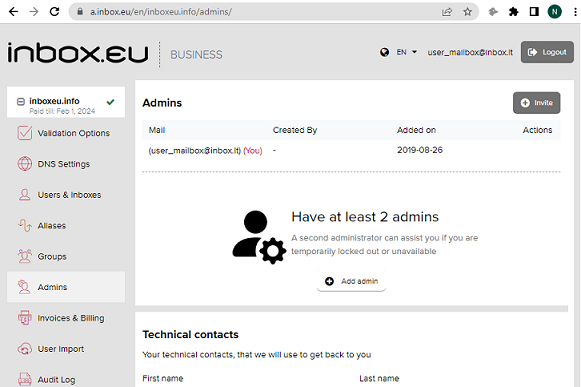
How add other administrator

  1. Login to admin panel of your domain email
  2. Open “Administrators” section
  3. Click on the “Invite” button or “Add new” and write email address of new administrator, click Send. Message will be sent to this email address.
  4. Login to mailbox, open this message and click “Approve invite” 
  5. Next step –  create authorization account (password and username)
  6. After successful login, new administrator can do management of your domain email.
daf1061bd3ce46dbf649ee92805ef7-1683545191-base.png


Jei neradote atsakymo, susisiekite su mumis
Klausimai

Creating User Mailboxes or Domain Mailboxes
How to log in to admin panel
Email inbox.lv migration to domain email
Recommended steps for successful migration of existing mailboxes
Business Inbox Registration
How and where to get a domain name for my e-mail
What is domain name
Premium Subscription for Business Inbox
Business Domain Email and Premium
Catch-all feature
Single-sign-on (SSO) with SAML & LDAP
Inbox.eu Affiliate Program
How to create domain email address?
Inbox.eu API (api.inbox.eu)
How add other administrator
Email migration from G-Suite/Google (custom domains only, 2nd method)
Email migration from G-Suite/Google (1st method)
Can't register a domain
End-to-end encryption
Demo version of business mail on Inbox.eu!
Registruotis Įeiti

  • Mail
  • Dokumentai
  • Kontaktai
  • Kalendorius
  • Žaidimai

  • Kontaktai
  • Palaikymas
  • Reklama
  • Privatumas
  • Naudojimosi sąlygos

Atsisiųskite mūsų programą